Powershell ISE is great for authoring of Powershell scripts, however it does not provide intellisense for object method parameters.
For example, if you type the below code snippet on ISE, you do not get any help regarding the parameters GetDirectories can take as input. It also does not indicate if there are overloads for the same method with varying parameters and types.
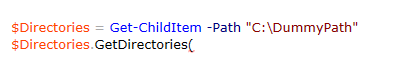
For invoking these method, we browse through MSDN documentation to figure out the type and number of parameters. However, in powershell we can use the below method technique to view all the method signatures.
The idea is to execute the method without the parenthesis. When a method is invoked without parenthesis, powershell would use reflection and output all the method signatures.


This would help you in knowing which types and overloads to use while invoking the method.
Hope this helps!!
Cheers!!
 Ritesh Modi - Principal Engineer
Leave a comment